AI Seller Advisor — Priya Gupta
ZILLOW · CASE STUDY

Seller Advisor

AI-assisted home selling experience that guides homeowners from considering a sale to listing with confidence. Seller Advisor unifies Zillow’s fragmented seller tools into one cohesive experience, providing personalized milestones, actionable next steps, and real-time contextual guidance at every stage.

ROLEMobile Design Lead
TEAMSeller Tools and Experience
TIMELINE2026
PLATFORMiOS (mobile-first, desktop in parallel)

The user problem

Homeowners spend months going through disconnected data in fragmented seller tools, unable to answer three fundamental questions:

Should I sell? When should I sell? What’s the right path for me? Looping for months

Hypothesis

IF we build a personalized, AI-guided recommendation framework that surfaces the next best action at each stage,

THEN we will build decision confidence, increase user retention, and drive seller conversions in the Zillow ecosystem.

The business problem

Zillow’s standalone tools (Zestimate, Market Insights, Demand Discovery) generate high engagement but the business loses sellers at the moment of decision.

Thinking about selling
Using the tools
↑ Biggest drop-off
Ready to take the next step
THE USER GAP

Zillow is a place people research selling, but not where they plan a sale.

THE BUSINESS GAP

Zillow is unable to bridge the gap between "thinking about selling" to "ready to sell."

THE "LIKELY SELLER" JOURNEY

The solution: Slice 1

01 Evaluate
02 Prepare to List
03 List & Find a Buyer
04 Close
SLICE ONE: MVP LAUNCHES Q3

The 4-milestone journey was too broad for one release, so I partnered with PM and Engineering to scope Slice 1: Evaluate, tackling the biggest point of user churn while establishing the AI foundation for future phases. With pressure to ship, we prioritized what delivered real seller value over what simply looked good in a demo.

What slice 1 solves A seller’s main job to be done: “What can I walk away with from my home sale?”

What a seller needs to do in order to get this job done

01Understand home valueGrounded in the trusted Zestimate.
02Learn market conditionsHighlighting real-time local buyer demand.
03Estimate net proceedsTransparent walk-away cash calculations.
04Decide how to sellPlainly communicating tradeoffs across listing models (agent, for-sale-by-owner, or cash offer).

Completing these four actions moves a seller from Evaluate to Prepare to List. The AI agent's job is to guide them through this journey.

Deep dive

The finalized design direction

Much of the friction sellers feel is numerical. They receive Zestimate, comps, market trends, days on market, equity estimates, and closing costs but almost no explanation of what any of it means for their house at this moment. Making sense of numbers is left entirely to them. That is where AI does the real work here: not generating more data, but explaining the data already on the screen.

Interactive prototype built in Claude Code using Zillow design system Open prototype →

What this experience does

Connected system, not isolated tools Weaves previously fragmented seller features into a single, guided platform rather than forcing users across disconnected pages.
Guided journey to net proceeds AI-assisted flow that directly answers the #1 seller question: "What will I actually walk away with?" and explains how the number was achieved.
Milestone-based structure, pills for actions Organizes the complex selling lifecycle into four clear milestones with actionable pills so users always know their current status and next step.
Ambient AI guidance, not AI takeover An ambient assistant that onboards users, explains complex financial calculations, and self-invokes when friction is detected. It steps back completely when users self-navigate.
Seller experience · structure

Anatomy of an action page

Every action page in the selling journey is built from the same seven parts. Home value is shown here with its canvas scrolled out.

Solution 01

AI Seller Advisor guides home fact updates via chat

The property records behind automated estimates are wrong more often than sellers expect. The Advisor collects corrections conversationally (beds, baths, finishes, condition), updating the estimate live as changes are confirmed.

Interactive prototype, built in Claude Code
Key features
Conversational Corrections The advisor prompts for updates one fact at a time instead of handing the seller a tedious multi-field form.
Synchronized Canvas State Every confirmed entry instantly updates the property record on the adjacent canvas.
Immediate Valuation Response Cause and effect is visible: correct the square footage, watch the Zestimate change.
Explicit User Confirmation No silent commits; every change requires explicit user verification before saving to the home record.
Solution 02

AI Advisor guides editing and understanding net proceeds

Applying the ambient AI pattern to the single metric sellers care about most: take-home cash built up transparently from sale price, mortgage payoff, and closing costs.

Interactive prototype, built in Claude Code
Key features
Live Net Proceeds Calculation Aggregates target sale price, mortgage payoff, agent commissions, and closing fees into a single running total.
Real-Time Input Adjustments Change the price or a cost assumption and the number recalculates in place.
Contextual Delta Explanations The AI Advisor provides plain-language notes explaining what shifted and why it impacts net proceeds.
Ends in a decision, not a report The seller leaves with a number they trust and a clear next action.
Solution 03

Self-discovery and self-serve home facts editing. Advisor steps back

Empowering sellers who prefer direct control over conversational AI. Users can bypass chat overlays to edit property attributes directly on the canvas UI while the ambient advisor provides non-intrusive feedback in the background.

Interactive prototype, built in Claude Code
Key features
Self-Serve Canvas Control Direct inline editing of home facts on the canvas for users who want fast, self-directed updates without chat interaction.
Live Zestimate recalculation with celebration moment Property updates trigger a live count-up animation, an updated valuation confidence range, and a refreshed Zestimate timestamp.
Contextual Next Steps Suggestions After each update, the advisor surfaces the logical next step, ensuring sellers always have a clear path forward with no dead ends.
Adaptive AI Insights Generates updated market insights and local buyer demand context based on the newly calibrated home baseline.
How we got there

The process at a glance

PLAN TAB TEAM · PRODUCT MANAGEMENT · ENGINEERING · CONTENT DESIGN · SENIOR LEADERSHIP TEAM
ALIGN Align on what to test
ALIGN Align on what it means
ALIGN Cross-platform review
ALIGN Scope + phasing
01
Kickoff prototype PM · CLAUDE
02
Design sprint FIGJAM
03
3 divergent prototypes CLAUDE CODE
04
Unmoderated research OUTSET.AI
05
Synthesis CLAUDE · FIGMA
06
MVP scope + IA deal PLAN TEAM · ENG
RESEARCH REOPENED THE PROTOTYPES
THE IA CONSTRAINT RESET THE SCOPE
{{ qKind }} {{ qTools }}
{{ qTitle }}

{{ qDesc }}

BRANCHES: PLAN TAB TEAM · PRODUCT · ENGINEERING · PRINCIPAL DESIGN
01 · PM · CLAUDE
Kickoff prototype

The first artifact wasn’t a PRD; our PM built a functional prototype in Claude. The conversation started with something we could click.

Earns: a shared starting point in days, not a spec cycle.
02 · FIGJAM
Design sprint

A workshop with the Plan tab team (sticky notes, clustering, dot voting) aimed at narrowing scope and naming the specific actions inside each milestone.

Earns: a shortlist to design against instead of a wishlist.
03 · CLAUDE CODE
Two divergent prototypes

Sixteen working hours to build both ends of the question: heavy AI guidance versus a plan the seller drives. Real inputs, real state.

Earns: two testable positions instead of one defended opinion.
04 · OUTSET.AI
Unmoderated research

30 homeowners, three parameters, rated 1–5 with open follow-ups. Findings back in four days: 30/30 wanted net proceeds; 23/30 wanted structure over chat.

Earns: evidence that killed the AI-first direction cleanly.
05 · CLAUDE · FIGMA
Synthesis

Rather than picking a winner, I combined the guidance of A, the structure of C, and the AI capability of B into an ambient model.

Earns: one direction with three sources of proof behind it.
06 · PLAN TEAM · ENG
MVP scope + IA deal

Negotiated autonomy inside the selling tab, 1 tap to value instead of 4, and phased the journey so Slice One ends at the decision point.

Earns: a shippable slice that still builds the whole system.

Kickoff

Instead of starting with a static spec, our PM kicked off the initiative with an interactive Claude prototype. I then ran a cross-functional FigJam design sprint, in collaboration with the Principal Designer, including our cross-functional engineering, and product teams to scope and align on the key user Jobs To Be Done we needed to solve for MVP Slice 1.

The first artifact was a functional prototype, not a PRD, that helped create immediate alignment across 12 partner teams.
DESIGN SPRINT TEAM 4 DESIGNERS · 16 ENGINEERS · 8 PMS · 1 MARKETING TEAM
DESIGN Me: Mobile Sr. Designer: Desktop Principal Designer: cross-platform consistency Content designer
ENGINEERING TEAMS AI experience team Mobile team Desktop team Zestimate valuation team
PRODUCT TEAMS Seller PMs AI team PMs Plan tab PM
MARKETING Marketing team
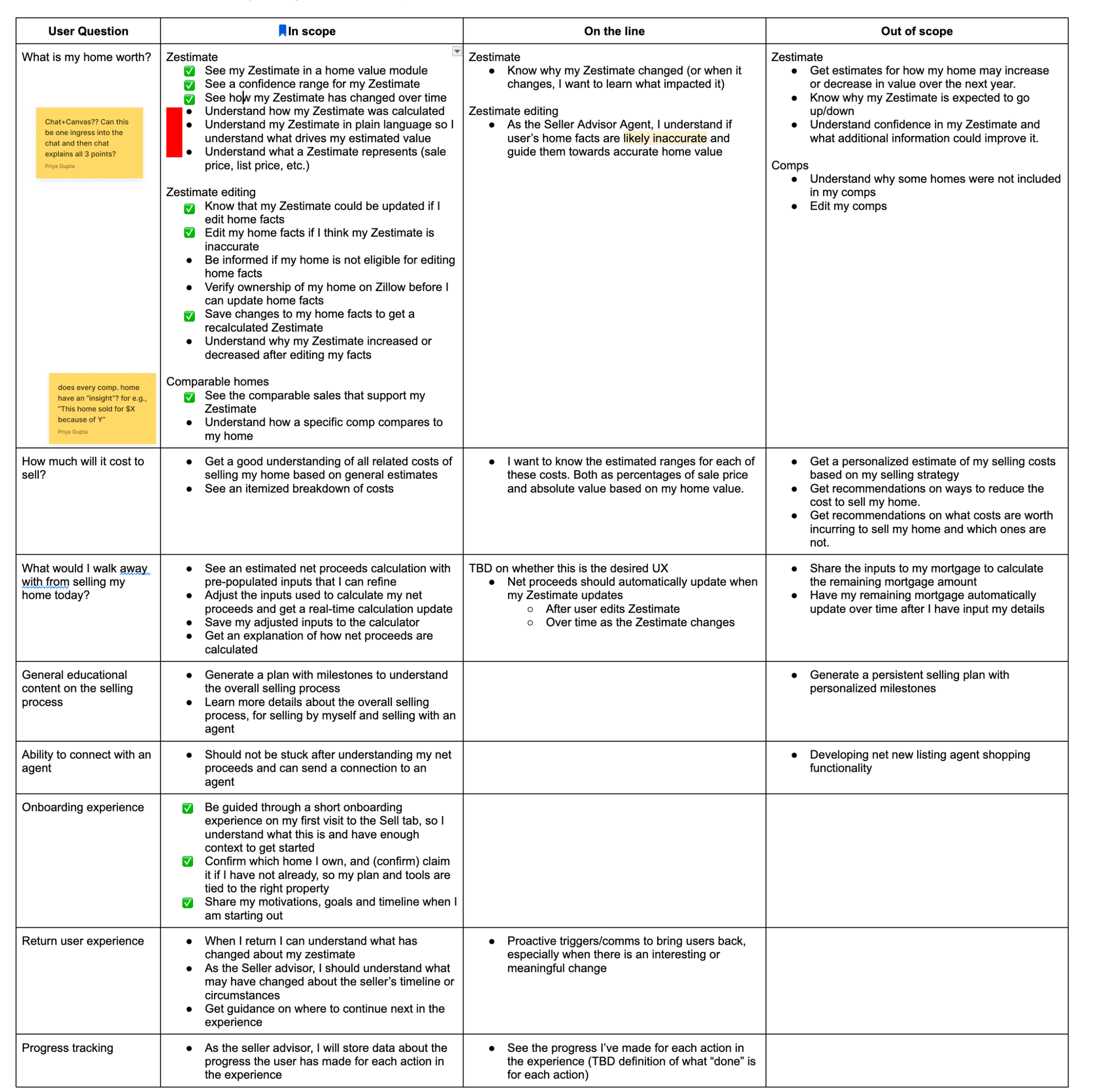
Design Sprint Output: MVP Slice 1 Requirements Every seller JTBD was sorted into in scope, on the line, and out of scope, so Design, Engineering, and Product were working from one agreed list.
Scope matrix from the design sprint: user questions mapped to in scope, on the line, and out of scope

How this fit into the system

Zillow’s recently-launched Plan Tab - a shared platform for buyers, renters, and sellers - required users to pass through three navigation layers before viewing actionable seller data. Research confirmed that deep navigation increased top-of-funnel drop-off.

Plan tab · Buying / Renting / Selling: my team
SHARED PLATFORM · PLAN TEAM OWNS ARCHITECTURE
Three screens before value
SCREEN 1 ENTRY
3:12
Plan
Still figuring it out?
Start with a plan
Financial snapshot
Market insights: Austin, TX
46/100
Buyers marketSellers market
N/A1-yr forecast 47 daysTo pending
Search99+UpdatesFavoritesPlanInbox
The Plan tab today: a prompt to start a plan, plus a market snapshot.
SCREEN 2 TAP 1
3:12
It all starts with a plan
Explore buying
Just browsing for now
Explore selling Coming soon
Explore buying & selling Coming soon
Search99+UpdatesFavoritesPlanInbox
Persona selection. Selling isn’t live yet; the seller lane lands here.
SCREEN 3 TAP 2
3:12
Plan
OverviewBuying
Set your starting budget Ground your search in real numbers.
Find the home Search, compare, get offer-ready.
Make an offer Plan your strategy and negotiate.
Close your purchase Finalize financing and close.
Search99+UpdatesFavoritesPlanInbox
The lane’s milestone list. Still nothing actionable on screen.
SCREEN 4 TAP 3
3:12
Evaluate
MILESTONE CONTENT · WHAT THEY CAME FOR
Your net proceeds $412,000
Home value + market Zestimate, demand, timing.
How to sell Agent, FSBO, or cash offer.
Search99+UpdatesFavoritesPlanInbox
Only now does the seller see the thing they came for.

The Plan tab's architecture required sellers to navigate through multiple screens before reaching anything actionable. Research told us sellers are already reluctant to commit; adding navigation depth would cause the same drop-off we were trying to fix. We negotiated with the Plan tab team: they keep their navigation, we get full autonomy within the selling tab. The broader IA challenge was scoped separately.

What I explored: How much should the AI do for the user?

Three of us on the seller design team built three deliberately divergent interaction models to feed the research study. The goal was to show leadership what was possible, and how AI could actually help a homeowner reach a decision and choose to sell with Zillow.

DIRECTION A AI-led step-by-step onboarding

AI walks users through 5 onboarding steps. It explains data, takes feedback, and confirms readiness at each step to build a customized plan.

Open prototype ↗
BetHeavy guidance upfront builds confidence → users explore independently after
DIRECTION B AI-first chat experience 

Persistent 50/50 chat interface where AI performs the cognitive heavy lifting. The user confirms, adjusts, and redirects as needed.

Open prototype ↗
BetThe journey is too complex → users want to delegate to an agent
DIRECTION C Structured navigation

Lightweight AI onboarding leading into a self-guided, layered tab structure. AI is always available but not proactive.

Open prototype ↗
BetUsers want control from the start → AI only when stuck
B A C
← MORE AI CONTROL MORE USER CONTROL →

What we learned

I led an unmoderated study with 30 homeowners on Outset.AI resulted in a 33% / 33% / 33% vote split across all three prototypes. Rather than a stalemate, this revealed that each model solved a distinct need.

A · Step-by-step guided flow 33% 10 votes Chosen for content depth and thoroughness.
B · AI chat-first 33% 10 votes Chosen for the AI-first layout, familiarity, and visual impression.
C · Layered navigation 33% 10 votes Chosen for clarity, control, and structure.
THE AI PRINCIPLE

Position AI as the system's nervous system, not a sidebar widget. Ambient agent proactively guides users, self-invoking when users hit friction and stepping back when they self-serve.

What 30 sellers told us

01
"What will I walk away with" is the dominant question Prototypes that surfaced a take-home number earned immediate trust. The Zestimate alone left the most important question unanswered.
02
Guided structure reduces overwhelm Sequential milestones and tab navigation were the top differentiator; participants wanted to feel oriented and in control, not pushed through a flow.
03
AI chat is a supplement, not the primary surface Only 7 of 30 wanted an AI-first experience. Chat worked when it was always accessible and never mandatory; the blocking overlay was the single biggest friction point.
04
Personalization builds instant trust Context-aware greetings and pre-populated data cut the feeling of starting from scratch: "It’s already learned my history."
05
Market context and renovation impact are the top secondary questions Is now a good time to sell, and how much would repairs change the price?
06
Concrete numbers hook users Every participant referenced dollar figures as what they focused on most. Transparent math signals credibility.
07
Fee clarity and a human are non-negotiable 35% said they would not list without an explicit cost breakdown and access to a live agent.
08
Visual impression can override usability 9 participants named layout or visual feel as their primary reason for choosing a prototype, not the information it gave them.

"Right off the bat where it says you could walk away with X amount of money, that is a very important thing for me."

Participant #64

"I liked this one because it didn’t seem to force me to use the AI chat, but if I did want to use it, it was really easy to find."

Participant #87

What I took forward

FROM ADepth and guidanceMilestones, step-by-step AI guidance, option to self-serve
FROM BChat interaction modelA proactive assistant with live canvas updates, reframed as dismissible.
FROM CStructure and controlTab navigation and layered information as the baseline.
NEWCosts & timeline moduleExplicit fees, repair ROI, and a live-agent option.
SPEED
3 prototypes in 16 hoursBuilt in Claude Code
Research plan + study in 2 days30 participants in Outset.AI
Prototype → Findings: 4 daysTraditional timeline: 4–6 weeks

What’s next

Engineering cycles have started, with a Q3 launch in sight. I was laid off before that ships, so the team carries it from here.

Next case study Seller Decision Making Toolkit →
Protected case study This work is under NDA. Enter the password from my résumé or email me for access.
That password didn't match.